
Before You Begin
Make sure you have a crypto wallet installed (MetaMask, Trust Wallet, or WalletConnect compatible wallet) and you're on the correct network (BSC Mainnet).
Overview
Connecting your wallet to Liquinex is the first step to accessing our DeFi platform. This guide will walk you through the entire process, from selecting your wallet provider to confirming your connection. The process is simple, secure, and takes less than a minute.
Liquinex supports multiple wallet providers including MetaMask, Trust Wallet, WalletConnect, and more. We use industry-standard security protocols to ensure your funds remain safe and under your control at all times.
Prerequisites
Before connecting your wallet, ensure you have:
- A compatible crypto wallet installed (MetaMask recommended for desktop)
- Some BNB for transaction fees
- Your wallet is on the Binance Smart Chain (BSC) network
- Your wallet is unlocked and ready to use
Step-by-Step Guide
Click "Connect Wallet" Button
Navigate to the Liquinex homepage and locate the "Connect Wallet" button in the top-right corner of the screen. Click on it to open the wallet selection modal.
Select Your Wallet Provider
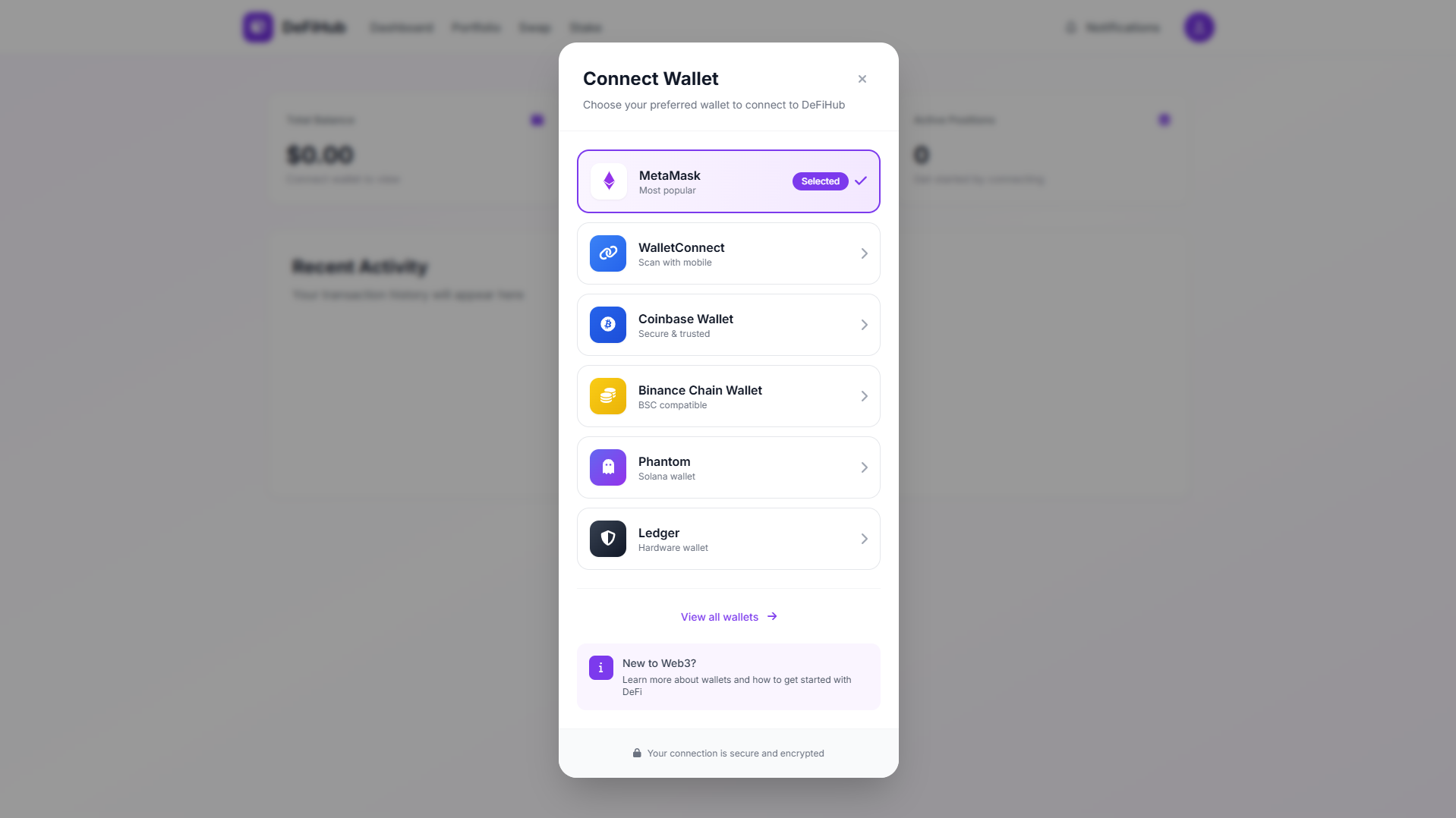
A modal will appear showing all supported wallet options. Choose your preferred wallet from the list:
- MetaMask: Most popular browser extension wallet
- WalletConnect: For mobile wallets (Trust Wallet, Rainbow, etc.)
- Coinbase Wallet: Coinbase's non-custodial wallet
- Binance Chain Wallet: Official BSC wallet
Approve the Connection
Your wallet will open and request permission to connect to Liquinex. Review the connection request carefully:
-
Check that the URL is correct:
app.liquinex.io - Review the permissions being requested
- Click "Connect" or "Approve" in your wallet
Security Warning
Always verify you're on the official Liquinex website before connecting your wallet. Never share your private keys or seed phrase with anyone, including our support team.
Confirm Network
Liquinex operates on the Binance Smart Chain (BSC). If you're not on the correct network, you'll be prompted to switch:
- Click "Switch Network" when prompted
- Approve the network change in your wallet
- Wait for the connection to be confirmed
BSC Network Details:
                      Network Name: BSC Mainnet
RPC URL: https://bsc-dataseed.binance.org/
Chain ID: 56
Symbol: BNB
Block Explorer: https://bscscan.com
Connection Complete!
Once connected, you'll see your wallet address displayed in the top-right corner. You're now ready to use Liquinex!
Success!
Your wallet is now connected. You can start trading, providing liquidity, staking, and exploring all features of the Liquinex platform.
Troubleshooting Common Issues
Connection Failed Error
If you see a "Connection Failed" error:
- Make sure your wallet is unlocked
- Clear your browser cache and try again
- Try using a different browser
- Disable any ad blockers or privacy extensions temporarily
Wrong Network
If you're on the wrong network:
- Click your wallet address in the top-right corner
- Select "Switch Network"
- Choose "BSC Mainnet" from the list
- Confirm the network switch in your wallet
Wallet Not Detected
If your wallet isn't detected:
- Make sure your wallet extension is installed and enabled
- Refresh the page
- Try clicking "Connect Wallet" again
- For mobile, use WalletConnect option
Security Best Practices
Follow these security tips to keep your wallet safe:
- Verify URLs: Always check you're on the official Liquinex website
- Use Hardware Wallets: For large amounts, consider using a hardware wallet like Ledger or Trezor
- Enable 2FA: If your wallet supports it, enable two-factor authentication
- Keep Software Updated: Regularly update your wallet software and browser
- Never Share Keys: Never share your private keys or seed phrase with anyone
- Check Permissions: Review what permissions you're granting when connecting
Next Steps
Now that your wallet is connected, you can:
- Make your first token swap
- Add liquidity to earn trading fees
- Stake your tokens to earn rewards
- Explore farming opportunities
- Participate in our launchpad IDOs
Pro Tip
Bookmark the official Liquinex URL and always access the platform through your bookmark to avoid phishing sites.
Frequently Asked Questions
Do I need BNB to connect my wallet?
No, you don't need BNB to connect your wallet. However, you'll need some BNB to pay for transaction fees when you want to trade, stake, or perform other actions on the platform.
Can I connect multiple wallets?
You can only have one wallet connected at a time. To switch wallets, disconnect your current wallet and connect a different one.
Is it safe to connect my wallet to Liquinex?
Yes, Liquinex is a non-custodial platform. We never have access to your private keys or funds. Your wallet remains in your full control at all times.
How do I disconnect my wallet?
Click on your wallet address in the top-right corner and select "Disconnect Wallet" from the dropdown menu.